
Introducing AI Action — Turn Your Organization System Into an Executable AI Workflow
Dieser Inhalt wurde noch nicht ins Deutsch übersetzt. Wir zeigen Ihnen unten die englische Version.
Today, we're officially launching the Eagle plugin AI Action.

AI Action lets you hand your organization rules to AI so it can execute them in bulk. No more renaming files one by one, writing descriptions manually, sorting into folders, or tagging each image by hand. You create Actions based on your own workflow, choose which operations to run, pick a model, and write Custom Instructions to go with them. AI follows your logic, not its own.
Here's what you can do with AI Action:
- AI Rename: Rename files based on image content
- AI Description: Analyze images and write to the description field
- AI Folders: Automatically sort images into existing folders
- AI Tags: Automatically apply tags based on your defined logic
These capabilities aren't hardcoded. You can freely combine operations: create an Action that only renames, one that only writes descriptions, or chain rename, description, folders, and tags into one complete workflow. What we care about most with AI Action is this: your organization method becomes a repeatable, executable workflow.
Why We Built AI Action
As your asset library grows, organization tends to hit two walls.
The first is that organizing takes a lot of time. You've been there: you import a batch of images but never get around to renaming them. You know they're worth keeping but keep putting off writing descriptions. You want to sort and tag them, but once the numbers pile up, it feels impossible. Images accumulate, and eventually the library becomes harder and harder to search.
The second is that everyone organizes differently. Some people prioritize filenames, others rely on descriptions. Some manage everything with folders, others live by tags. Some care about photographic language, others about brand tone, emotional mood, or how assets fit into a proposal. There shouldn't be a one-size-fits-all answer to asset organization.
AI Action was designed to solve both problems. It doesn't replace your organization logic. It lets you hand that logic to AI for batch execution. You define the rules, AI handles the work. Organizing stops being a personal habit locked in your head and becomes a method you can actually reuse.
In Rethinking Image Organization in the Age of AI, we share the design philosophy behind AI Action. We hope it sparks some ideas for how you combine Eagle with AI.
What Is AI Action?
AI Action is a composable AI workflow tool. You create different Actions and specify what each one does. An Action can handle a single task or chain multiple steps together.
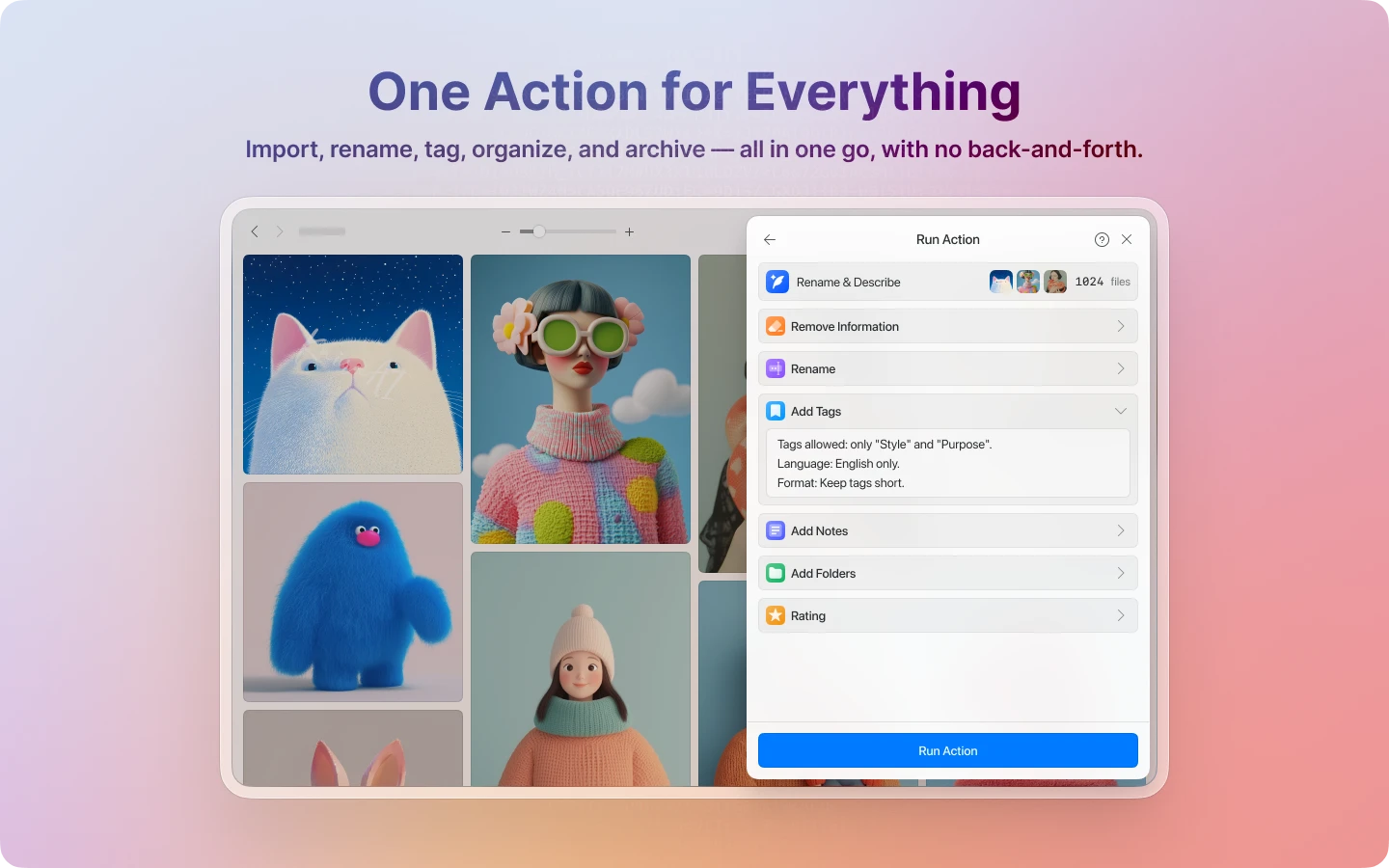
You could create an Action that only renames images, or one that only writes descriptions. You could build an Action that auto-sorts images based on your folder structure, or one that tags images by style, color palette, and intended use. You can also chain everything together into one end-to-end pipeline.
AI Action is an organization tool you design around your own needs. The question isn't "what can AI do?" but "how do you want AI to do it?"
AI Rename: Make Filenames Clearer and More Consistent
When images land in your library, their original filenames are often useless. Garbled strings from a download, camera-generated serial numbers, or names that made sense at the time but are forgotten days later. As files pile up, poor filenames quietly become a major drag on how quickly you can recognize and find things.
AI Action can generate recognizable names based on image content. You can have it describe the subject, capture the color tone or style, unify the language, add a prefix, enforce a character limit, or follow your own naming conventions. Some people want names in their native language; others prefer lowercase English. Some want every filename to start with REF_; others want names from a photographic perspective that include composition details. All of this goes through settings and Custom Instructions.
As your library grows, a consistent naming convention is far easier to maintain and search through than a pile of scattered original filenames. Good filenames aren't just cosmetic. They make things findable.
AI Description: Give Your Images Useful Text Information
If AI Rename builds a more intuitive outer layer of identification, AI Description adds a richer layer of text underneath. You can have AI write its analysis into the description field, turning each image from just a picture into something searchable.
You can ask AI to describe the main subject and scene, analyze the components and layout of a UI screen, break down the composition, lighting, and mood of a photograph, note brand tone and proposal contexts, or extract text content from an image. You can also tell it to focus only on what you care about and ignore the rest. This is the most extensible capability in AI Action, because the real difficulty in organizing images is usually retrieval: can you find it again later? Will you remember what it was? Can text search surface it when you need it?
When images carry richer descriptions, everything improves. Going back to find something yourself, using Eagle's search, running keyword queries. AI Description builds a semantic layer for each image so it can be understood, searched, and put back to work.
AI Folders: Automatically Sort Into Your Existing Folder Structure
AI Action can also classify images automatically. AI analyzes image content and places assets into your existing folders, saving you the time you'd otherwise spend dragging and sorting by hand.
This works best when you already have a clear folder structure. The more explicit your folder names, descriptions, and boundaries are, the more stable AI's classification results will be. If your folders already distinguish UI component screenshots from brand references, product photography from portrait work, and layout examples from everything else, AI Folders can move things into place reliably.
AI Folders isn't for building an organization system from scratch. It's for accelerating one that already exists. The more mature your folder structure, the better it works.
AI Tags: Hand Off the Work You Keep Putting Off
Tagging is valuable, but it's the easiest thing to put off. Not because it's hard, but because it eats time. You look at each image, think of the right terms, decide whether it's worth tagging, then figure out which category it belongs to. One or two images is fine. Once the numbers grow, "later" becomes "never."
AI Action can batch-process tagging for you. Based on your tagging system, you can have AI analyze color, style, subject, mood, intended use, composition, or whatever dimensions matter to you. The clearer your tag groups, naming conventions, and rules, the better the results.
The real win here is that organization tasks you've always known were important but could never consistently finish now actually get done. At scale, the gap between manual and batch processing is much wider than you'd expect.
Custom Instructions: The Real Core of AI Action
If we had to name one thing that makes AI Action work, it wouldn't be "it has four features." It would be this: you can use Custom Instructions to define how AI should interpret your images.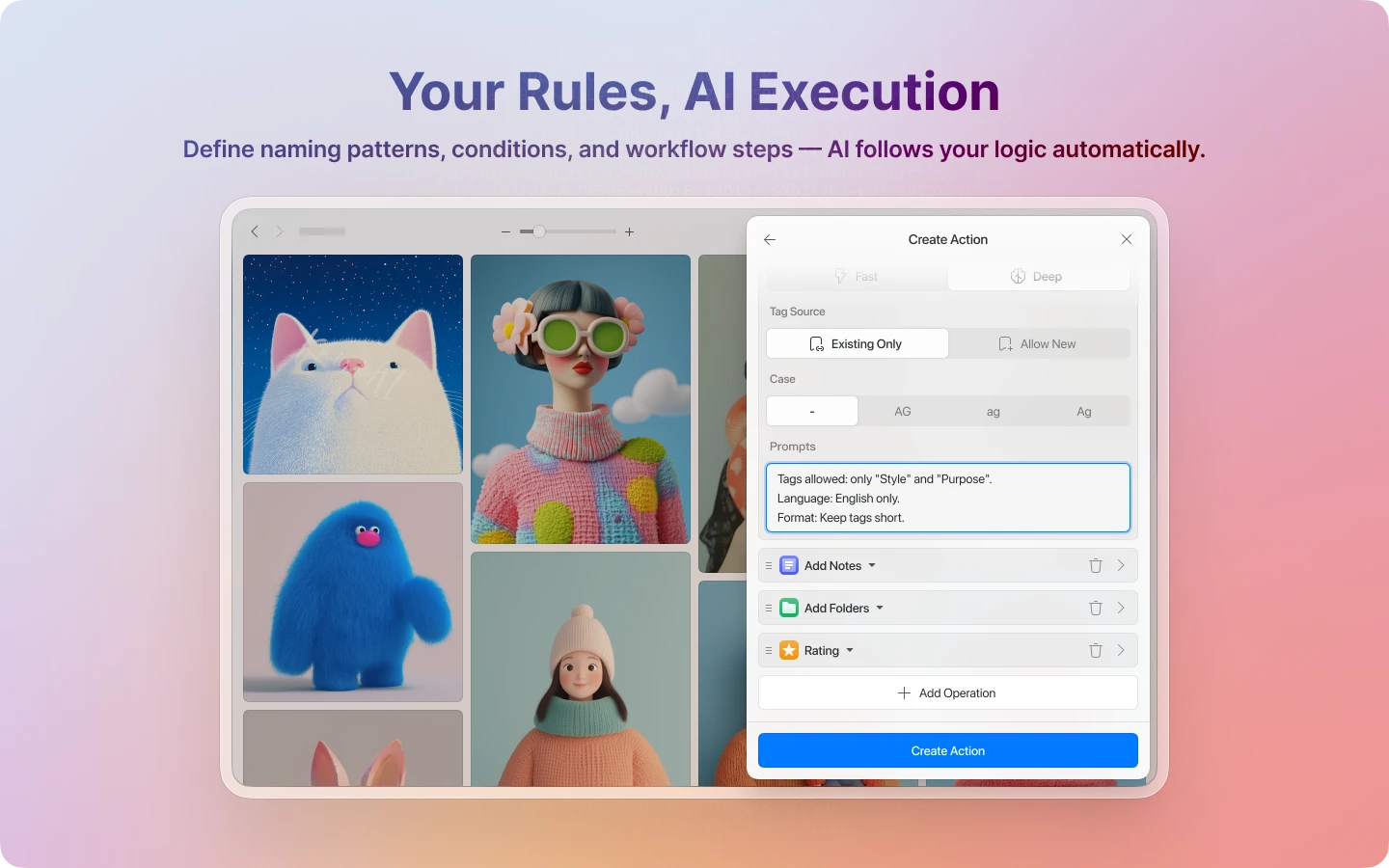
The same image means different things to different people. A UI designer cares about interface type, components, and layout. A photographer cares about composition, lighting, color tone, and subject relationships. A brand designer cares about emotion, tone, and proposal context. An e-commerce team cares about product type, shooting angle, and categorization. A generic analysis approach produces results that are "roughly correct" but never quite good enough to actually use.
Custom Instructions let you use your own language and logic to define how AI reads your images. You're not accepting AI's default interpretation. You're telling AI: this is how these images should be seen, described, and organized.
Your Organization Method Becomes Reproducible
The most useful thing about AI Action isn't saving clicks. It's that organization work that used to depend entirely on personal habits and judgment becomes reproducible, batchable, and reusable.
You probably already have your own way of organizing: how filenames should be structured, how descriptions should be written, which images go where, which get which tags. Before, all of that was manual, one image at a time. Now you encode those rules into an Action and let AI execute them.
Your organization method becomes an executable system. Organization stops being a one-time effort and starts compounding.
Who AI Action Is For
AI Action is especially useful if: your asset library has grown too large to organize by hand; you already have consistent naming, description, classification, and tagging habits; you want to codify your organization logic and reapply it; you want to enrich images with text so searching works better later; or you're not satisfied with generic AI analysis and want AI to work the way you work.
The best results come when you already know how you want to organize, you're willing to spend time on Custom Instructions, and you have folder or tag structures in place. For classification and tagging especially, the clearer your existing structure, the more stable AI's output will be.
AI Action isn't here to replace your organization system. It's here to run it at scale.
Pair It With AI Search for the Complete Picture
If AI Search solves "how do I find things," then AI Action solves how do I make things easier to find.
Use AI Action to give images more complete names, descriptions, classifications, and tags. Then use AI Search to find them again. When images carry richer information, hit rates go up whether you're searching with natural language, existing text fields, or visual similarity.
Organization and search shouldn't be separate workflows. AI Action fills in the data; AI Search turns it into findability.
Let AI Organize for You, Your Way
AI Action is available today. You no longer have to choose between "do everything manually" and "hand it all to generic AI." Keep your own organization logic, hand the rules to AI, and get your organizing done faster and more consistently.
If you've been accumulating assets in Eagle and never had enough time to organize them properly, AI Action is worth trying. It helps you actually finish the organization work you already knew how to do.
To get started quickly, check out the AI Action Quick Start Guide. It walks you through creating your first Action from scratch.
To go deeper into how AI Action works and get the most out of it, see the AI Action Best Practices Guide. It covers the four core concepts, feature applications, Custom Instructions examples, and model selection advice.
Verwandte Beiträge